Exhibit 1 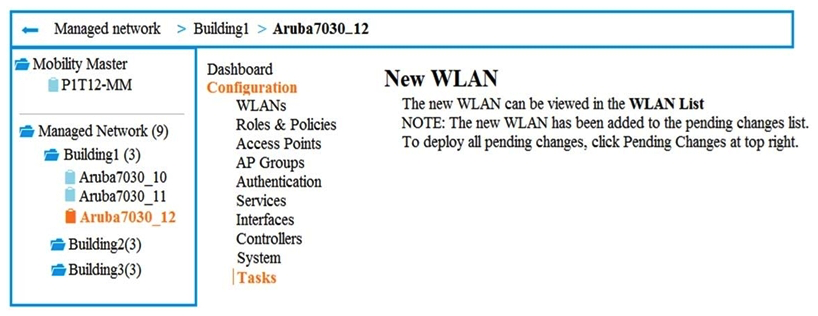 Exhibit 2
 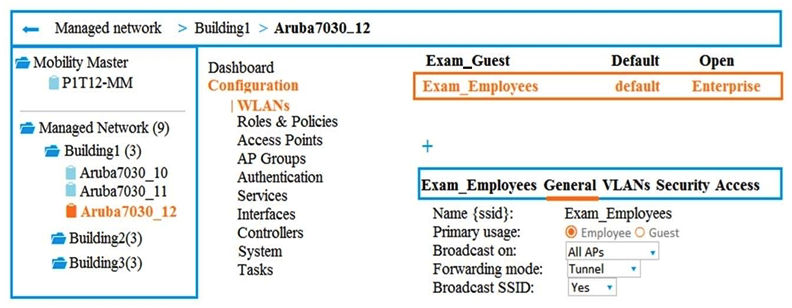 A company has an Aruba Mobility Master (MM) -based solution and needs a new WLAN for the corporate campus. A network administrator completes the creation of this WLAN, as shown in Exhibit 1. When the administrator tries to test a connection to the WLAN in various locations, the WLAN sometimes shows up in the list of WLANs on the client but sometimes does not. The administrator can see the WLAN in the list, as shown in Exhibit 2. What is the error?
A) The WLAN is configured at a lower level in the Managed Network hierarchy.
B) The configuration is not deployed to the Mobility Controller (MC) .
C) The Mobility Master (MM) does not have an active PEFNG license.
D) The WLAN is configured as a hidden SSID.
Correct Answer:

Verified
Q3: Which settings can a Mobility Master (MM)
Q4: A customer has a large campus that
Q5: A network administrator monitors an Aruba Mobility
Q6: How does a high-gain omni-directional antenna compare
Q7: An Aruba solution runs ArubaOS 8 and
Q9: Refer to the exhibit. Q10: An administrator creates service-based policies for AirGroup Q11: How does WPA2 protect wireless user traffic Q12: A network administrator creates the role employees Q13: Refer to the exhibit. 
Unlock this Answer For Free Now!
View this answer and more for free by performing one of the following actions

Scan the QR code to install the App and get 2 free unlocks

Unlock quizzes for free by uploading documents