




 Chat with AI


Database Processing: Fundamentals, Design, and Implementation 13th Edition by David Kroenke, David Auer
Edition 13ISBN: 978-0133058352Database Processing: Fundamentals, Design, and Implementation 13th Edition by David Kroenke, David Auer
Edition 13ISBN: 978-0133058352 Exercise 1
Heather Sweeney is an interior designer who specializes in home kitchen design. She offers a variety of seminars at home shows, kitchen and appliance stores, and other public locations. The seminars are free; she offers them as a way of building her customer base. She earns revenue by selling books and videos that instruct people on kitchen design. She also offers custom-design consulting services.
After someone attends a seminar, Heather wants to leave no stone unturned in attempting to sell that person one of her products or services. She would therefore like to develop a database to keep track of customers, the seminars they have attended, the contacts she has made with them, and the purchases they have made. She wants to use this database to continue to contact her customers and offer them products and services.
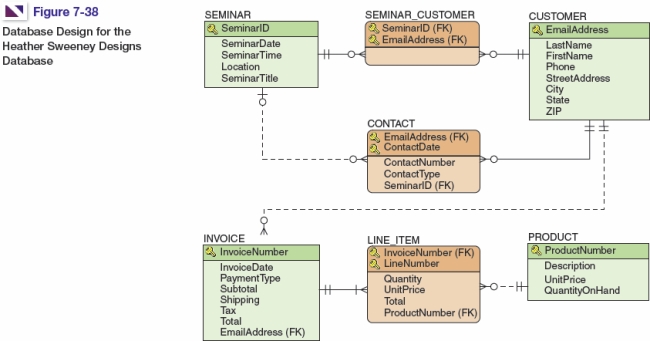
For reference, the SQL statements shown here are built from the HSD database design Figure 7-38, the sample database column specifications (shown for the SEMINAR table only) in Figure 7-39, and the referential integrity constraint specifications detailed in Figure 7-40.
The SQL statements to create the Heather Sweeney Designs (HSD) database are shown in Figure 7-41 in SQL Server syntax. The SQL statements to populate the HSD database are shown in Figure 7-42, again in SQL Server syntax.
 Write SQL statements and answer questions for this database as follows:
A. Create a database named HSD in your DBMS.
B. Create a folder in your My Documents folder to save and store *.sql scripts containing the SQL statements that you are asked to create in the remaining questions in this section.
C. Write an SQL script named HSD-Create-Tables.sql based on Figure 7-41 to create the tables and relationships for the HSD database. Save this script, and then execute the script to create the HSD tables.
D. Write an SQL script named HSD-Insert-Data.sql based on Figure 7-42 to insert the data for the HSD database. Save this script, and then execute the script to populate the HSD tables.
E. Write SQL statements to list all columns for all tables.
F. Write an SQL statement to list LastName, FirstName, and Phone for all customers who live in Dallas.
G. Write an SQL statement to list LastName, FirstName, and Phone for all customers who live in Dallas and have a LastName that begins with the letter T.
H. Write an SQL statement to list the INVOICE.InvoiceNumber for sales that include the Heather Sweeney Seminar Live in Dallas on 25-OCT-09 -Video. Use a subquery. (Hint: The correct solution uses three tables in the query because the question asks for INVOICE.InvoiceNumber. Otherwise, there is a possible solution with only two tables in the query.)
I.Answer part G but use a join.
J. Write an SQL statement to list the FirstName, LastName, and Phone of customers (list each name only once) who have attended the Kitchen on a Big D Budget seminar. Sort the results by LastName in descending order, and then by FirstName in descending order.
K. Write an SQL statement to list the FirstName, LastName, Phone, ProductNumber and Description of customers (list each combination of name and video product only once) who have purchased a video product. Sort the results by LastName in descending order, then by FirstName in descending order, and then by ProductNumber in descending order. (Hint: Video products have a ProductNumber that starts with VK.)
L. Write an SQL statement to show the sum of SubTotal (this is the money earned by HSD on products sold exclusive of shipping costs and taxes) for INVOICE as SumOfSubTotal.
N. Write an SQL statement to show both the sum and the average of Subtotal (this is the money earned by HSD on products sold exclusive of shipping costs and taxes) for INVOICE as SumOfSubTotal and AverageOfSubTotal respectively.
O. Write an SQL statement to modify PRODUCT UnitPrice for ProductNumber VK004 to $34.95 instead of the current UnitPrice of $24.95.
P. Write an SQL statement to undo the UnitPrice modification in part N.
Q. Do not run your answer to the following question in your actual database! Write the fewest number of DELETE statements possible to remove all the data in your database but leave the table structures intact.
R. Write an SQL statement to create a view called InvoiceSummaryView that contains INVOICE.InvoiceNumber, INVOICE.InvoiceDate, LINE_ITEM.LineNumber, SALE_ITEM.ItemID, PRODUCT.Description, and LINE_ITEM.UnitPrice. Run the statement to create the view, and then test the view with an appropriate SQL SELECT statement.
S. Create and test a user-defined function named LastNameFirst that combines two parameters named FirstName and LastName into a concatenated name field formatted LastName, FirstName (including the comma and space).
T. Write an SQL statement to create a view called CustomerInvoiceSummaryView that contains INVOICE.InvoiceNumber, INVOICE.InvoiceDate, the concatenated customer name using the LastNameFirst function, CUSTOMER.EmailAddress, and INVOICE.Total. Run the statement to create the view, and then test the view with an appropriate SQL statement.
After someone attends a seminar, Heather wants to leave no stone unturned in attempting to sell that person one of her products or services. She would therefore like to develop a database to keep track of customers, the seminars they have attended, the contacts she has made with them, and the purchases they have made. She wants to use this database to continue to contact her customers and offer them products and services.
For reference, the SQL statements shown here are built from the HSD database design Figure 7-38, the sample database column specifications (shown for the SEMINAR table only) in Figure 7-39, and the referential integrity constraint specifications detailed in Figure 7-40.
The SQL statements to create the Heather Sweeney Designs (HSD) database are shown in Figure 7-41 in SQL Server syntax. The SQL statements to populate the HSD database are shown in Figure 7-42, again in SQL Server syntax.
Write SQL statements and answer questions for this database as follows:A. Create a database named HSD in your DBMS.
B. Create a folder in your My Documents folder to save and store *.sql scripts containing the SQL statements that you are asked to create in the remaining questions in this section.
C. Write an SQL script named HSD-Create-Tables.sql based on Figure 7-41 to create the tables and relationships for the HSD database. Save this script, and then execute the script to create the HSD tables.
D. Write an SQL script named HSD-Insert-Data.sql based on Figure 7-42 to insert the data for the HSD database. Save this script, and then execute the script to populate the HSD tables.
E. Write SQL statements to list all columns for all tables.
F. Write an SQL statement to list LastName, FirstName, and Phone for all customers who live in Dallas.
G. Write an SQL statement to list LastName, FirstName, and Phone for all customers who live in Dallas and have a LastName that begins with the letter T.
H. Write an SQL statement to list the INVOICE.InvoiceNumber for sales that include the Heather Sweeney Seminar Live in Dallas on 25-OCT-09 -Video. Use a subquery. (Hint: The correct solution uses three tables in the query because the question asks for INVOICE.InvoiceNumber. Otherwise, there is a possible solution with only two tables in the query.)
I.Answer part G but use a join.
J. Write an SQL statement to list the FirstName, LastName, and Phone of customers (list each name only once) who have attended the Kitchen on a Big D Budget seminar. Sort the results by LastName in descending order, and then by FirstName in descending order.
K. Write an SQL statement to list the FirstName, LastName, Phone, ProductNumber and Description of customers (list each combination of name and video product only once) who have purchased a video product. Sort the results by LastName in descending order, then by FirstName in descending order, and then by ProductNumber in descending order. (Hint: Video products have a ProductNumber that starts with VK.)
L. Write an SQL statement to show the sum of SubTotal (this is the money earned by HSD on products sold exclusive of shipping costs and taxes) for INVOICE as SumOfSubTotal.
N. Write an SQL statement to show both the sum and the average of Subtotal (this is the money earned by HSD on products sold exclusive of shipping costs and taxes) for INVOICE as SumOfSubTotal and AverageOfSubTotal respectively.
O. Write an SQL statement to modify PRODUCT UnitPrice for ProductNumber VK004 to $34.95 instead of the current UnitPrice of $24.95.
P. Write an SQL statement to undo the UnitPrice modification in part N.
Q. Do not run your answer to the following question in your actual database! Write the fewest number of DELETE statements possible to remove all the data in your database but leave the table structures intact.
R. Write an SQL statement to create a view called InvoiceSummaryView that contains INVOICE.InvoiceNumber, INVOICE.InvoiceDate, LINE_ITEM.LineNumber, SALE_ITEM.ItemID, PRODUCT.Description, and LINE_ITEM.UnitPrice. Run the statement to create the view, and then test the view with an appropriate SQL SELECT statement.
S. Create and test a user-defined function named LastNameFirst that combines two parameters named FirstName and LastName into a concatenated name field formatted LastName, FirstName (including the comma and space).
T. Write an SQL statement to create a view called CustomerInvoiceSummaryView that contains INVOICE.InvoiceNumber, INVOICE.InvoiceDate, the concatenated customer name using the LastNameFirst function, CUSTOMER.EmailAddress, and INVOICE.Total. Run the statement to create the view, and then test the view with an appropriate SQL statement.
Explanation Verified
Verified
A.
This is self-explanatory.
B. For the ...

Database Processing: Fundamentals, Design, and Implementation 13th Edition by David Kroenke, David Auer

Why don’t you like this exercise?
Other Minimum 8 character and maximum 255 character
Character 255