




 Chat with AI

Deck 8: Use Advanced Features
Full screen (f)

Question

Question
Question
Question
Question
Question
Question
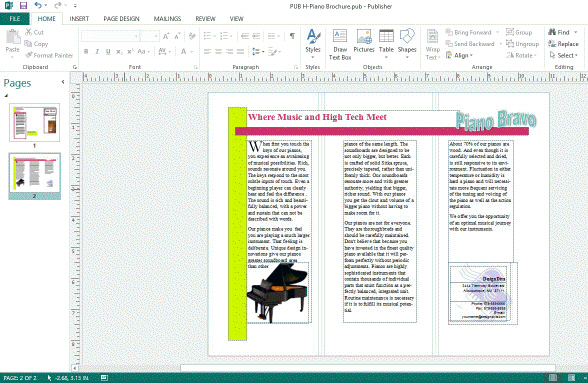 The accompanying figure shows Loose text wrapping applied to the text near the piano image.
 Question
Question
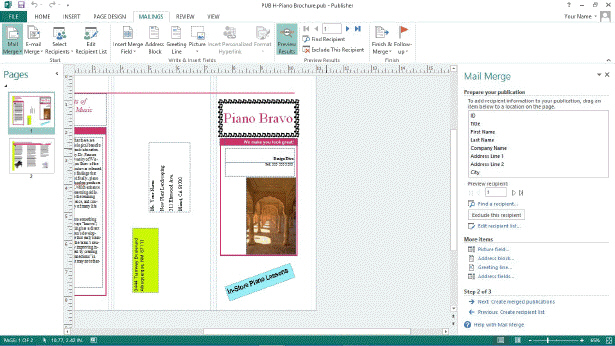 In the accompanying figure, the address block is rotated 90 degrees.
 Question
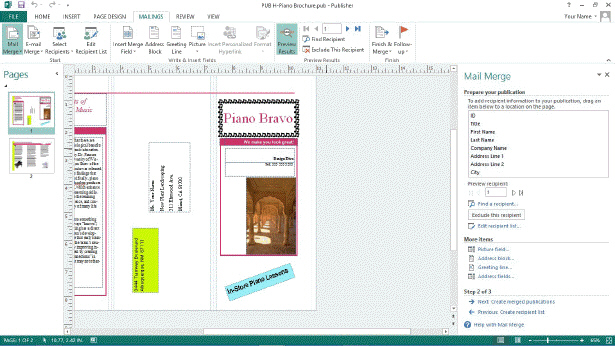 When creating a mail merge, if you add extra spaces to the Name fields in the data source, the spaces will appear in the address text box in the final merged document.
 Question
Question
Question
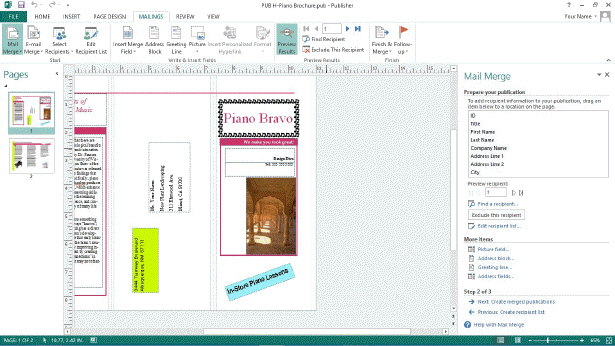 In the accompanying figure, if you want to change the name of a recipient, you should click the Edit recipient list link to open the Edit Data Target dialog box.
 Question
Question
Question
Question
Question
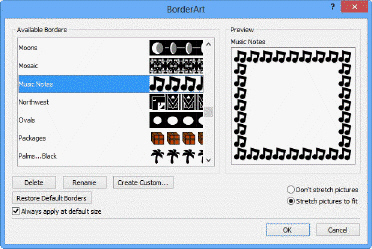 Referring to the accompanying figure, in order to change the size of the border you need to deselect the check box Always apply at default size.
 Question
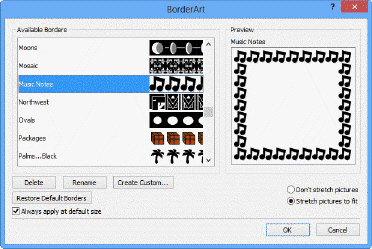 Referring to the accompanying figure, the Moons border is not currently available.
 Question
Question
Question
Question
Question
Question
Question
Question
Question
Question
Question
Question
Question
Question
Question
Question
Question
Question
Question
Question
Question
Question
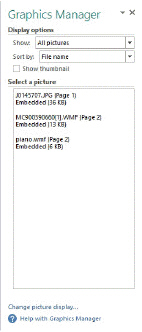
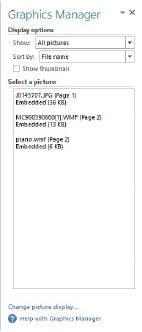
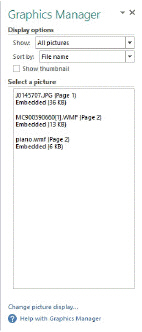 The Graphics Manager shown in the accompanying figure is accessed in the Show group on the ____ tab.
A) INSERT
B) VIEW
C) EDIT
D) HOME
Question
Question
Question
 Referring to the accompanying figure, if you move on to the next step and click Print preview, you will view the preview in ____ view.
A) Newsletter
B) Publisher
C) Publication
D) Backstage
Question
Question
Question
Question
Question
Question
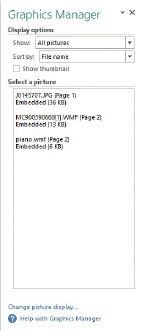
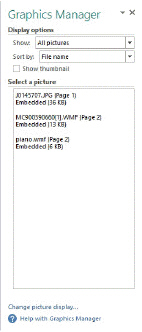 Used in conjunction with the Graphics Manager pane shown in the accompanying figure, the Fonts dialog box is available as part of Embedded Font Information in the Info command on the ____ tab.
A) FILE
B) VIEW
C) INSERT
D) HOME
Question
Question
 The accompanying figure shows the preview of a(n) ____.
A) Mail Merge
B) Address Pane
C) Mailing Pane
D) Address Merge
Question
 Referring to the accompanying figure, you can click the two entries under Step 2 of 3 to move back and forth between ____.
A) panes
B) dialog boxes
C) records
D) mail boxes
Question
Question
Question
Question
Question
Question
Match between columns
Question
Question
Question
Question
Question
Match between columns
Question
Match between columns
Question
Match between columns
Question
Match between columns
Question
Match between columns
Question
Match between columns
Question
Match between columns

Unlock Deck
Sign up to unlock the cards in this deck!
Unlock Deck
Unlock Deck
1/70

Play

Full screen (f)
Deck 8: Use Advanced Features
1
Using WordArt, you can add shadows and patterns to text.
True
2
When doing a mail merge, extra spaces in your data fields will be removed.
False
3
After you wrap text you should review it to make sure the hyphenation is correct.
True
4
The Wrap Text button is in the Arrange group on the Picture Tools Format tab.
Unlock Deck
Unlock for access to all 70 flashcards in this deck.
Unlock Deck
k this deck
5
Text transformed into a shape is called BorderArt .
Unlock Deck
Unlock for access to all 70 flashcards in this deck.
Unlock Deck
k this deck
6
To delete a wrap point, press and hold [Ctrl] and click the wrap point you want removed.
Unlock Deck
Unlock for access to all 70 flashcards in this deck.
Unlock Deck
k this deck
7
The accompanying figure shows Loose text wrapping applied to the text near the piano image. Unlock Deck
Unlock for access to all 70 flashcards in this deck.
Unlock Deck
k this deck
8
When creating a mail merge, filtering changes the order in which a merged publication is printed or viewed.
Unlock Deck
Unlock for access to all 70 flashcards in this deck.
Unlock Deck
k this deck
9
In the accompanying figure, the address block is rotated 90 degrees. Unlock Deck
Unlock for access to all 70 flashcards in this deck.
Unlock Deck
k this deck
10
When creating a mail merge, if you add extra spaces to the Name fields in the data source, the spaces will appear in the address text box in the final merged document. Unlock Deck
Unlock for access to all 70 flashcards in this deck.
Unlock Deck
k this deck
11
A data source file can only come from one type of program.
Unlock Deck
Unlock for access to all 70 flashcards in this deck.
Unlock Deck
k this deck
12
To reorient text so that it appears correctly when a publication is folded, you should wrap it.
Unlock Deck
Unlock for access to all 70 flashcards in this deck.
Unlock Deck
k this deck
13
In the accompanying figure, if you want to change the name of a recipient, you should click the Edit recipient list link to open the Edit Data Target dialog box. Unlock Deck
Unlock for access to all 70 flashcards in this deck.
Unlock Deck
k this deck
14
First name, last name, and zip code are all examples of records.
Unlock Deck
Unlock for access to all 70 flashcards in this deck.
Unlock Deck
k this deck
15
You should always preview your merged publications before printing.
Unlock Deck
Unlock for access to all 70 flashcards in this deck.
Unlock Deck
k this deck
16
You cannot add a border to a text box.
Unlock Deck
Unlock for access to all 70 flashcards in this deck.
Unlock Deck
k this deck
17
A commercial printing service can use Publisher format to do pre-press work.
Unlock Deck
Unlock for access to all 70 flashcards in this deck.
Unlock Deck
k this deck
18
Referring to the accompanying figure, in order to change the size of the border you need to deselect the check box Always apply at default size. Unlock Deck
Unlock for access to all 70 flashcards in this deck.
Unlock Deck
k this deck
19
Referring to the accompanying figure, the Moons border is not currently available. Unlock Deck
Unlock for access to all 70 flashcards in this deck.
Unlock Deck
k this deck
20
The first Pack and Go Wizard dialog box defines the location where the packed file will be stored.
Unlock Deck
Unlock for access to all 70 flashcards in this deck.
Unlock Deck
k this deck
21
To change the size of a BorderArt pattern, modify the ____ text box.
A) Default
B) Width
C) Size
D) Custom
A) Default
B) Width
C) Size
D) Custom
Unlock Deck
Unlock for access to all 70 flashcards in this deck.
Unlock Deck
k this deck
22
Which of the following can be a data source file in a mail merge?
A) Outlook contact list
B) Word table
C) database
D) All of the above
A) Outlook contact list
B) Word table
C) database
D) All of the above
Unlock Deck
Unlock for access to all 70 flashcards in this deck.
Unlock Deck
k this deck
23
To ensure that a recipient's contact information is set correctly in a merge, insert a(n) ____.
A) address block
B) text box
C) field
D) data source
A) address block
B) text box
C) field
D) data source
Unlock Deck
Unlock for access to all 70 flashcards in this deck.
Unlock Deck
k this deck
24
To save money and paper, you should always ____ your merge before printing it.
A) preview
B) filter
C) sort
D) output
A) preview
B) filter
C) sort
D) output
Unlock Deck
Unlock for access to all 70 flashcards in this deck.
Unlock Deck
k this deck
25
You should consult with printing professionals about all of the following EXCEPT: ____.
A) paper stock
B) binding
C) trimming
D) wrapping
A) paper stock
B) binding
C) trimming
D) wrapping
Unlock Deck
Unlock for access to all 70 flashcards in this deck.
Unlock Deck
k this deck
26
You can rotate an object using all of the following methods EXCEPT: ____.
A) dragging the rotation handle
B) using the Edit Shape button
C) using the Rotate button
D) using the Drawing Tools Format tab
A) dragging the rotation handle
B) using the Edit Shape button
C) using the Rotate button
D) using the Drawing Tools Format tab
Unlock Deck
Unlock for access to all 70 flashcards in this deck.
Unlock Deck
k this deck
27
You can add BorderArt using the ____.
A) Objects toolbar
B) Design Gallery
C) Clip Gallery
D) BorderArt dialog box
A) Objects toolbar
B) Design Gallery
C) Clip Gallery
D) BorderArt dialog box
Unlock Deck
Unlock for access to all 70 flashcards in this deck.
Unlock Deck
k this deck
28
To add an illusion of depth to a graphic, add a ____.
A) pattern
B) shadow
C) shape
D) border
A) pattern
B) shadow
C) shape
D) border
Unlock Deck
Unlock for access to all 70 flashcards in this deck.
Unlock Deck
k this deck
29
A ____ is a file format you can use if your commercial printer doesn't accept Publisher files.
A) data source
B) PostScript
C) pre-press
D) CMYK
A) data source
B) PostScript
C) pre-press
D) CMYK
Unlock Deck
Unlock for access to all 70 flashcards in this deck.
Unlock Deck
k this deck
30
In a mail merge, state, street address, age, and customer ID are all examples of a ____.
A) data source
B) merge file
C) field
D) record
A) data source
B) merge file
C) field
D) record
Unlock Deck
Unlock for access to all 70 flashcards in this deck.
Unlock Deck
k this deck
31
In a mail merge, a ____ could be a spreadsheet.
A) data source
B) merge file
C) field
D) record
A) data source
B) merge file
C) field
D) record
Unlock Deck
Unlock for access to all 70 flashcards in this deck.
Unlock Deck
k this deck
32
When a publication is to be folded, you should ____ text boxes so that they will appear right side up.
A) wrap
B) rotate
C) fill
D) flip
A) wrap
B) rotate
C) fill
D) flip
Unlock Deck
Unlock for access to all 70 flashcards in this deck.
Unlock Deck
k this deck
33
In a mail merge, a ____ contains all of the information about a particular entity.
A) data source
B) merge file
C) field
D) record
A) data source
B) merge file
C) field
D) record
Unlock Deck
Unlock for access to all 70 flashcards in this deck.
Unlock Deck
k this deck
34
You can add decorative borders to any object or text box using ____.
A) WordArt
B) TextArt
C) BorderArt
D) Clip Art
A) WordArt
B) TextArt
C) BorderArt
D) Clip Art
Unlock Deck
Unlock for access to all 70 flashcards in this deck.
Unlock Deck
k this deck
35
The default text wrapping is ____.
A) Tight
B) Square
C) Right-aligned
D) Centered
A) Tight
B) Square
C) Right-aligned
D) Centered
Unlock Deck
Unlock for access to all 70 flashcards in this deck.
Unlock Deck
k this deck
36
You can add WordArt using the ____.
A) Text Box button
B) Design Gallery
C) Clip Organizer
D) WordArt gallery
A) Text Box button
B) Design Gallery
C) Clip Organizer
D) WordArt gallery
Unlock Deck
Unlock for access to all 70 flashcards in this deck.
Unlock Deck
k this deck
37
You can open the Mail Merge task pane by clicking the ____ tab on the Ribbon.
A) OBJECTS
B) VIEW
C) FILE
D) MAILINGS
A) OBJECTS
B) VIEW
C) FILE
D) MAILINGS
Unlock Deck
Unlock for access to all 70 flashcards in this deck.
Unlock Deck
k this deck
38
Text shaped in a semi-circle is created using ____.
A) Text Shape
B) Text Wrapping
C) WordArt
D) All of the above.
A) Text Shape
B) Text Wrapping
C) WordArt
D) All of the above.
Unlock Deck
Unlock for access to all 70 flashcards in this deck.
Unlock Deck
k this deck
39
The ____ tool allows you to change the character spacing within the current WordArt object.
A) Spacing
B) Edit Text
C) Change WordArt Shape
D) WordArt Even Height
A) Spacing
B) Edit Text
C) Change WordArt Shape
D) WordArt Even Height
Unlock Deck
Unlock for access to all 70 flashcards in this deck.
Unlock Deck
k this deck
40
____ text reshapes the flow of text around an image or object.
A) Copyfitting
B) AutoFitting
C) Wrapping
D) Formatting
A) Copyfitting
B) AutoFitting
C) Wrapping
D) Formatting
Unlock Deck
Unlock for access to all 70 flashcards in this deck.
Unlock Deck
k this deck
41
The Graphics Manager shown in the accompanying figure is accessed in the Show group on the ____ tab.A) INSERT
B) VIEW
C) EDIT
D) HOME
Unlock Deck
Unlock for access to all 70 flashcards in this deck.
Unlock Deck
k this deck
42
In a mail merge, a(n) ____________________ is a category of information, such as a last name or street address.
Unlock Deck
Unlock for access to all 70 flashcards in this deck.
Unlock Deck
k this deck
43
CMYK, which stands for Cyan Magenta Yellow ____, is a color model used by many commercial printers.
A) Blue
B) Black
C) Brown
D) Kool
A) Blue
B) Black
C) Brown
D) Kool
Unlock Deck
Unlock for access to all 70 flashcards in this deck.
Unlock Deck
k this deck
44
Referring to the accompanying figure, if you move on to the next step and click Print preview, you will view the preview in ____ view.A) Newsletter
B) Publisher
C) Publication
D) Backstage
Unlock Deck
Unlock for access to all 70 flashcards in this deck.
Unlock Deck
k this deck
45
____________________ is a color model preferred by many commercial printers.
Unlock Deck
Unlock for access to all 70 flashcards in this deck.
Unlock Deck
k this deck
46
Which of the following is NOT true about the Pack and Go Wizard?
A) It is available from the REVIEW tab.
B) It helps you take your fonts and graphics to another printer.
C) You can choose to save the files to your flash drive.
D) As part of the packing process, the wizard prints the publication.
A) It is available from the REVIEW tab.
B) It helps you take your fonts and graphics to another printer.
C) You can choose to save the files to your flash drive.
D) As part of the packing process, the wizard prints the publication.
Unlock Deck
Unlock for access to all 70 flashcards in this deck.
Unlock Deck
k this deck
47
In a mail merge, a(n) ____________________ is a complete set of information about an individual or an item.
Unlock Deck
Unlock for access to all 70 flashcards in this deck.
Unlock Deck
k this deck
48
Case Margene works for a commercial printing company. Her new client, Jorge, asks for help preparing his publication for printing. Jorge asks Margene to do some ____ work, such as checking the availability of fonts and linked graphics.
A) hand-off
B) pre-press
C) PostScript
D) CMYK
A) hand-off
B) pre-press
C) PostScript
D) CMYK
Unlock Deck
Unlock for access to all 70 flashcards in this deck.
Unlock Deck
k this deck
49
____________________ is a graphic added to the outside of an object.
Unlock Deck
Unlock for access to all 70 flashcards in this deck.
Unlock Deck
k this deck
50
Used in conjunction with the Graphics Manager pane shown in the accompanying figure, the Fonts dialog box is available as part of Embedded Font Information in the Info command on the ____ tab.A) FILE
B) VIEW
C) INSERT
D) HOME
Unlock Deck
Unlock for access to all 70 flashcards in this deck.
Unlock Deck
k this deck
51
____________________ is text that is treated as a shape.
Unlock Deck
Unlock for access to all 70 flashcards in this deck.
Unlock Deck
k this deck
52
The accompanying figure shows the preview of a(n) ____.A) Mail Merge
B) Address Pane
C) Mailing Pane
D) Address Merge
Unlock Deck
Unlock for access to all 70 flashcards in this deck.
Unlock Deck
k this deck
53
Referring to the accompanying figure, you can click the two entries under Step 2 of 3 to move back and forth between ____.A) panes
B) dialog boxes
C) records
D) mail boxes
Unlock Deck
Unlock for access to all 70 flashcards in this deck.
Unlock Deck
k this deck
54
Case Margene works for a commercial printing company. Her new client, Jorge, asks for help preparing his publication for printing. Jorge uses the ____ pane to determine the names, file types, and sizes of objects in his publication.
A) Pack and Go
B) Format Publication
C) Graphics Manager
D) Mail Merge
A) Pack and Go
B) Format Publication
C) Graphics Manager
D) Mail Merge
Unlock Deck
Unlock for access to all 70 flashcards in this deck.
Unlock Deck
k this deck
55
The ____ format is the final file format you deliver to a commercial printer.
A) data source
B) PostScript
C) pre-press
D) hand-off
A) data source
B) PostScript
C) pre-press
D) hand-off
Unlock Deck
Unlock for access to all 70 flashcards in this deck.
Unlock Deck
k this deck
56
A(n) ____________________ point is a handle used to change the flow of text around an object.
Unlock Deck
Unlock for access to all 70 flashcards in this deck.
Unlock Deck
k this deck
57
Case Margene works for a commercial printing company. Her new client, Jorge, asks for help preparing his publication for printing. Margene tells Jorge that the ____ format for his project is PostScript.
A) hand-off
B) pre-press
C) Pack and Go
D) CMYK
A) hand-off
B) pre-press
C) Pack and Go
D) CMYK
Unlock Deck
Unlock for access to all 70 flashcards in this deck.
Unlock Deck
k this deck
58
Case Margene works for a commercial printing company. Her new client, Jorge, asks for help preparing his publication for printing. Once Jorge saves his file as ____ he cannot make changes to it.
A) a mail merge
B) a data source
C) a PostScript file
D) a pre-press
A) a mail merge
B) a data source
C) a PostScript file
D) a pre-press
Unlock Deck
Unlock for access to all 70 flashcards in this deck.
Unlock Deck
k this deck
59
Match between columns
Unlock Deck
Unlock for access to all 70 flashcards in this deck.
Unlock Deck
k this deck
60
The Publisher format is accessible with the ____ Wizard. This Wizard verifies linked graphics, embeds TrueType fonts, and will pack all the files your printing service might need.
A) Print and Go
B) Pack and Go
C) Post-press
D) Pre-press
A) Print and Go
B) Pack and Go
C) Post-press
D) Pre-press
Unlock Deck
Unlock for access to all 70 flashcards in this deck.
Unlock Deck
k this deck
61
Describe the different steps of a mail merge.
Unlock Deck
Unlock for access to all 70 flashcards in this deck.
Unlock Deck
k this deck
62
What are some ways you can prepare a publication for commercial printing?
Unlock Deck
Unlock for access to all 70 flashcards in this deck.
Unlock Deck
k this deck
63
What is text wrapping? Describe some common text wrap techniques and features.
Unlock Deck
Unlock for access to all 70 flashcards in this deck.
Unlock Deck
k this deck
64
Match between columns
Unlock Deck
Unlock for access to all 70 flashcards in this deck.
Unlock Deck
k this deck
65
Match between columns
Unlock Deck
Unlock for access to all 70 flashcards in this deck.
Unlock Deck
k this deck
66
Match between columns
Unlock Deck
Unlock for access to all 70 flashcards in this deck.
Unlock Deck
k this deck
67
Match between columns
Unlock Deck
Unlock for access to all 70 flashcards in this deck.
Unlock Deck
k this deck
68
Match between columns
Unlock Deck
Unlock for access to all 70 flashcards in this deck.
Unlock Deck
k this deck
69
Match between columns
Unlock Deck
Unlock for access to all 70 flashcards in this deck.
Unlock Deck
k this deck
70
Match between columns
Unlock Deck
Unlock for access to all 70 flashcards in this deck.
Unlock Deck
k this deck
Unlock Deck
Unlock for access to all 70 flashcards in this deck.